NewsStay updated with our latest posts.
Over the past few days, I have been working on a tool that makes it easier for less experienced administrators to install and manage their own Vernissage instance.
I am happy to say that the first complete version is now working. Using vernissagectl, I was able to deploy an entirely new Vernissage instance under a new domain in just a few minutes.
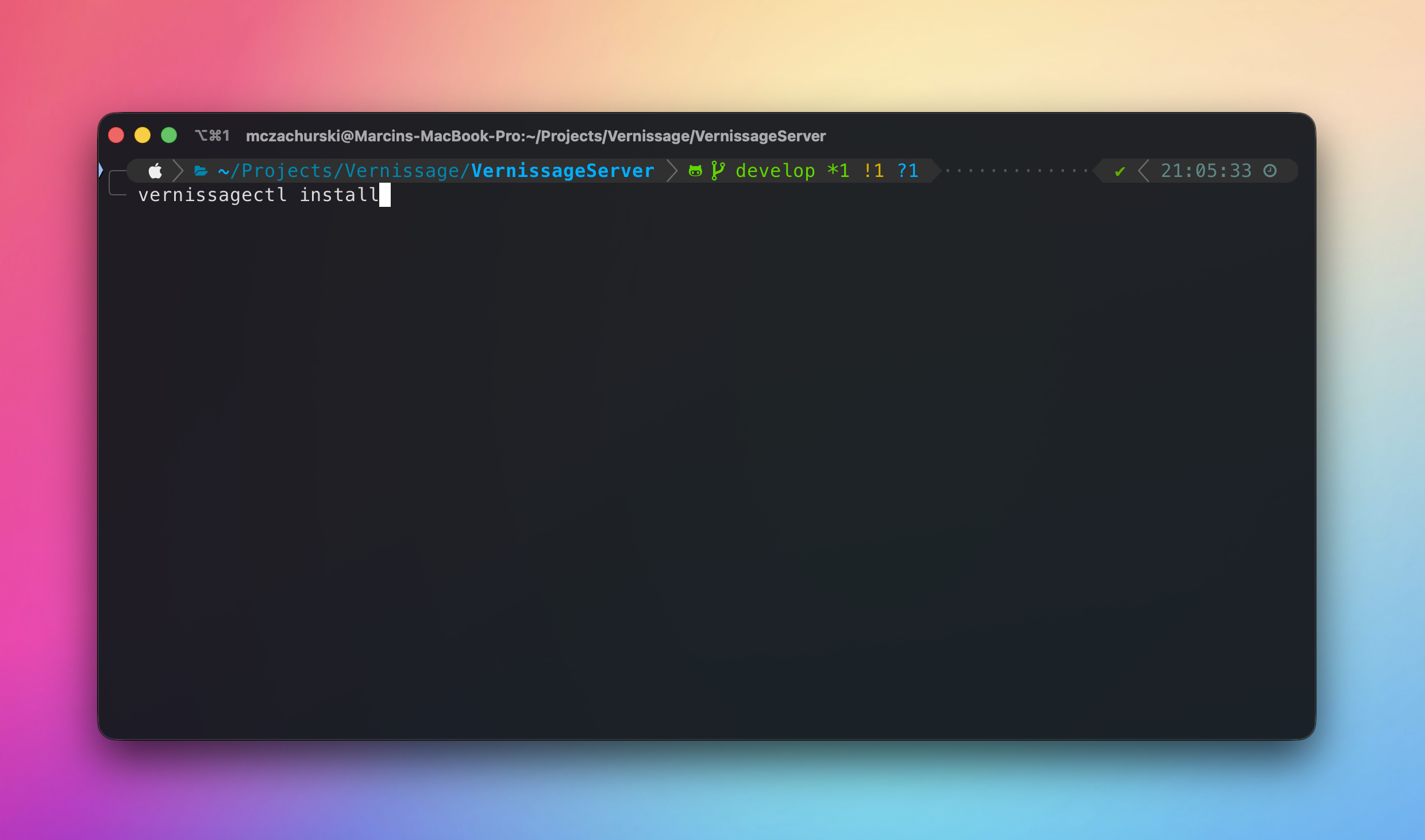
The process was surprisingly straightforward: I registered a domain, created an Ubuntu virtual machine in Azure, installed Docker and vernissagectl, and followed the installation wizard. Once it finished, I could immediately open the new instance and sign in with the administrator account created during setup.
Pretty simple!
You can find the source code, complete documentation, and available commands in the Vernissage Installer repository.
Important:
vernissagectlis currently experimental and undergoing production testing. The available features are already complete enough to install and perform basic management of a Vernissage instance, but you should still monitor your installation carefully and maintain regular backups.
Who is this installer for?
vernissagectl creates and manages a Docker-based installation on a single server. This makes it particularly suitable for small and medium-sized instances that do not expect very high traffic.
For larger installations, I recommend separating critical services across multiple machines or using managed infrastructure. The main vernissage.photos installation, for example, runs multiple instances of important services to provide redundancy and reduce downtime.
That level of complexity is usually unnecessary for a small community or personal instance, where running everything on one properly maintained server can be a reasonable starting point.
Before you begin
You will need a server and a domain name.
Server
Create a new server running Ubuntu 24.04. Both x86-64 and ARM64 are supported.
Your server should have:
- A static or reserved public IPv4 address, or a correctly configured public IPv6 address.
- Enough CPU, memory, and disk space for the expected number of users and uploaded photographs.
- Inbound TCP ports
80and443open. - SSH access, normally through TCP port
22.
If you use Azure, AWS, or another cloud provider, remember that ports may need to be opened both in the operating system firewall and in the provider’s network firewall or security group.
Restrict SSH access to trusted IP addresses whenever possible.
Domain
Register a new domain or create a subdomain for the instance, for example:
photos.example.com
Add the appropriate DNS record:
- An
Arecord for a public IPv4 address. - An
AAAArecord for a public IPv6 address.
Only create an AAAA record if the server has fully working public IPv6 connectivity.
You can check whether the record is resolving with:
dig +short A photos.example.com
dig +short AAAA photos.example.com
You can also use nslookup if dig is unavailable. Keep in mind that DNS changes may take some time to propagate.
Important: The domain becomes the permanent federated identity of your instance. Changing it later can break existing ActivityPub relationships, so choose it carefully before installation.
Recommended production services
The installer can create local PostgreSQL, Redis, and MinIO containers. This is convenient for smaller installations, but local Docker volumes are not backups. A disk or server failure may still cause permanent data loss.
For a production instance, consider preparing the following services in advance.
Managed PostgreSQL
A managed PostgreSQL service is strongly recommended. Ideally, it should provide:
- Automatic backups or snapshots.
- Point-in-time recovery.
- Monitoring and alerts.
- A documented upgrade procedure.
- Storage redundancy.
The installer can also create PostgreSQL locally if you prefer a simpler setup. If you choose this option, arrange regular off-server backups.
S3 object storage
You can use:
- AWS S3, which is currently the most thoroughly tested option.
- Another S3-compatible storage service.
- A local MinIO container created by the installer.
For AWS or another provider, create an S3 bucket and credentials that allow Vernissage to upload, download, and delete objects in that bucket.
A CDN such as CloudFront is optional, but it can reduce traffic to your storage service and improve image delivery for geographically distributed users.
Redis
Using a local Redis container is perfectly reasonable for most small installations. Redis is used for queues, distributed locks, and temporary data. PostgreSQL and S3 remain the primary sources of persistent application data.
Install Docker
Connect to the server over SSH:
ssh your-user@your-server-address
Install Docker Engine and the Docker Compose plugin using the official Docker installation instructions for Ubuntu.
After installation, verify that Docker is running:
sudo systemctl status docker
sudo docker run hello-world
By default, Ubuntu may require sudo to access the Docker daemon. This is normal.
Docker can also be configured for use without sudo, but adding a user to the docker group grants that user root-level privileges. Follow Docker’s official Linux post-installation guide and only grant this access to trusted administrators.
Install vernissagectl
Download and install the latest version:
curl -fsSL https://joinvernissage.org/install.sh | sudo sh
If you prefer, you can inspect the installation script before running it:
curl -fsSL https://joinvernissage.org/install.sh -o install.sh
less install.sh
sudo sh install.sh
Verify the installation:
vernissagectl --version
Run the installation wizard
If your user does not have permission to access Docker directly, run:
sudo vernissagectl install
If Docker works for your user without sudo, you can instead run:
vernissagectl install
Use the same privilege model for subsequent management commands.
The wizard will guide you through the complete installation, including:
- Checking Docker and Docker Compose.
- Verifying the instance domain and network configuration.
- Connecting to or installing PostgreSQL.
- Connecting to or installing Redis.
- Configuring AWS S3, another S3-compatible service, or local MinIO.
- Installing the Vernissage API and background jobs.
- Creating the permanent administrator account.
- Installing the web application and Web Push service.
- Building and configuring the Vernissage reverse proxy.
- Configuring HTTPS.
Read each question carefully. The recommended choices are a good default for most installations.
For a publicly accessible instance, select: Production HTTPS — Automatic Let's Encrypt certificate. For automatic certificate issuance to work, the domain must resolve to the server and ports 80 and 443 must be publicly reachable.
The development HTTPS option uses a locally issued certificate and is intended only for testing. Browsers and other devices will not trust it automatically.
After installation
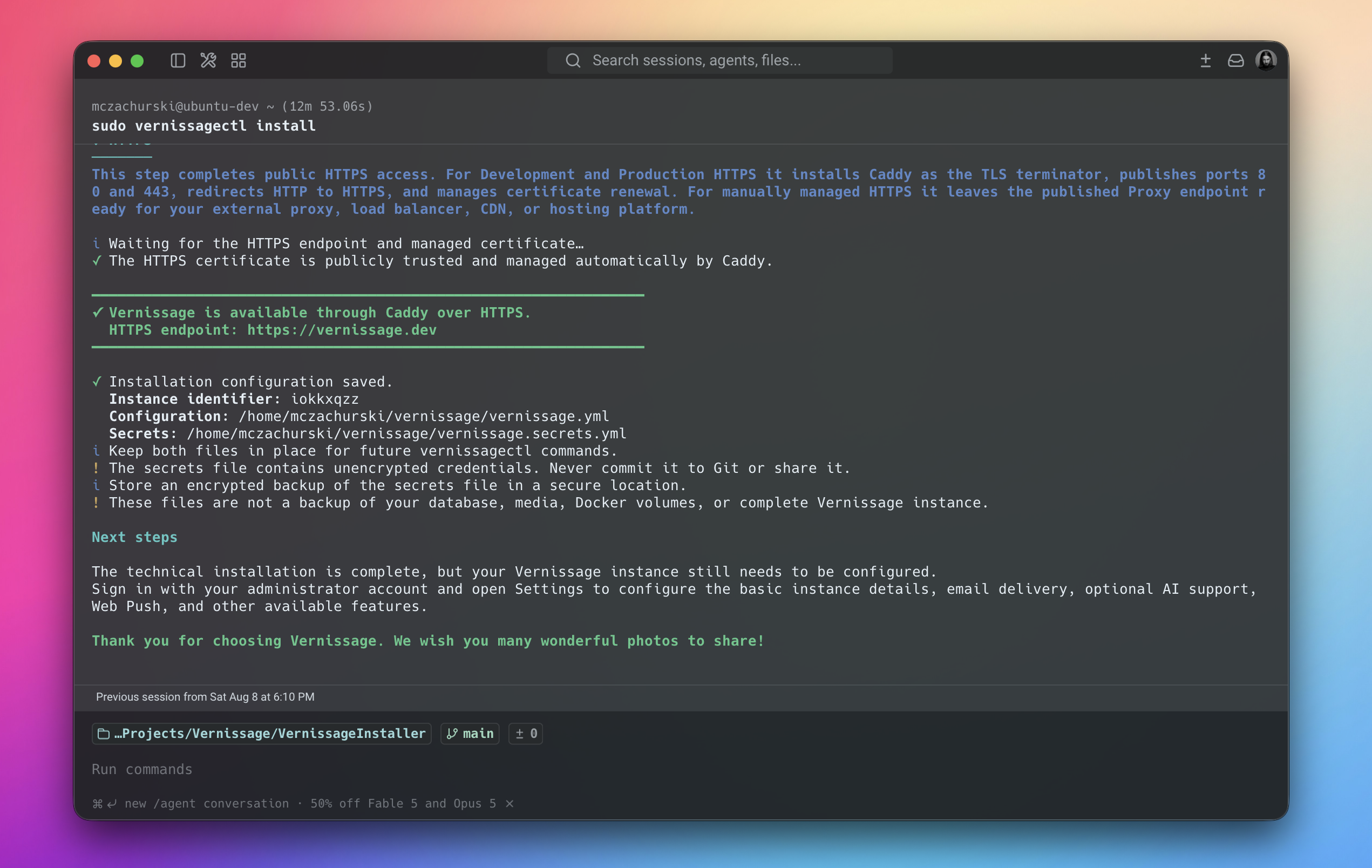
When all checks pass, the installer will display the HTTPS address of the new instance. Open it in a browser and sign in using the administrator account created during installation. The installer disables the default administrator login as part of the setup.
The technical installation is now complete, but the instance still needs some application-level configuration. Open the Settings page and review:
- Instance name and description.
- Administrator and contact information.
- Email and SMTP delivery.
- Registration and moderation settings.
- Web Push notifications.
- Optional AI integrations.
- Storage and image URL settings.
You can verify the installation from the server with:
sudo vernissagectl doctor
sudo vernissagectl status
Run the commands from the directory containing the generated configuration, or pass it explicitly:
sudo vernissagectl --config /path/to/vernissage.yml doctor
Keep the generated configuration safe
At the end of the installation, vernissagectl creates two important files:
vernissage.ymldescribes the installed services and allows future management commands to locate the correct containers.vernissage.secrets.ymlcontains sensitive credentials required to recreate or update the installation.
The installer will print their exact locations.
Do not commit vernissage.secrets.yml to Git or share it with anyone. Store an encrypted copy in a secure location. Losing the file may make future recovery and maintenance more difficult.
These configuration files are not backups of your database or uploaded photographs. You should still maintain separate backups of PostgreSQL and S3 or MinIO data, preferably outside the server.
That’s it 🎉
Your new Vernissage instance should now be online and ready to use.
Thank you for choosing Vernissage. I hope your new community grows into a great place for sharing many wonderful photographs!
TL;DR: In July, the total operating cost of the https://vernissage.photos platform was $451.17, of which $187.19 was covered by contributions from supporters. Thank you very much for every contribution!
Below is a detailed financial report covering the operation of https://vernissage.photos in July 2026. The report is broken down by individual service providers whose services are essential to keeping the platform running.
Amazon (S3 + CloudFront)
Vernissage uses Amazon S3 to store user-uploaded files and relies on Amazon CloudFront—a content delivery network (CDN)—to distribute them quickly and reliably across the internet.
- Total storage used: 994 GB
- Total number of files: 4,205,759
- Total cost: $49.71
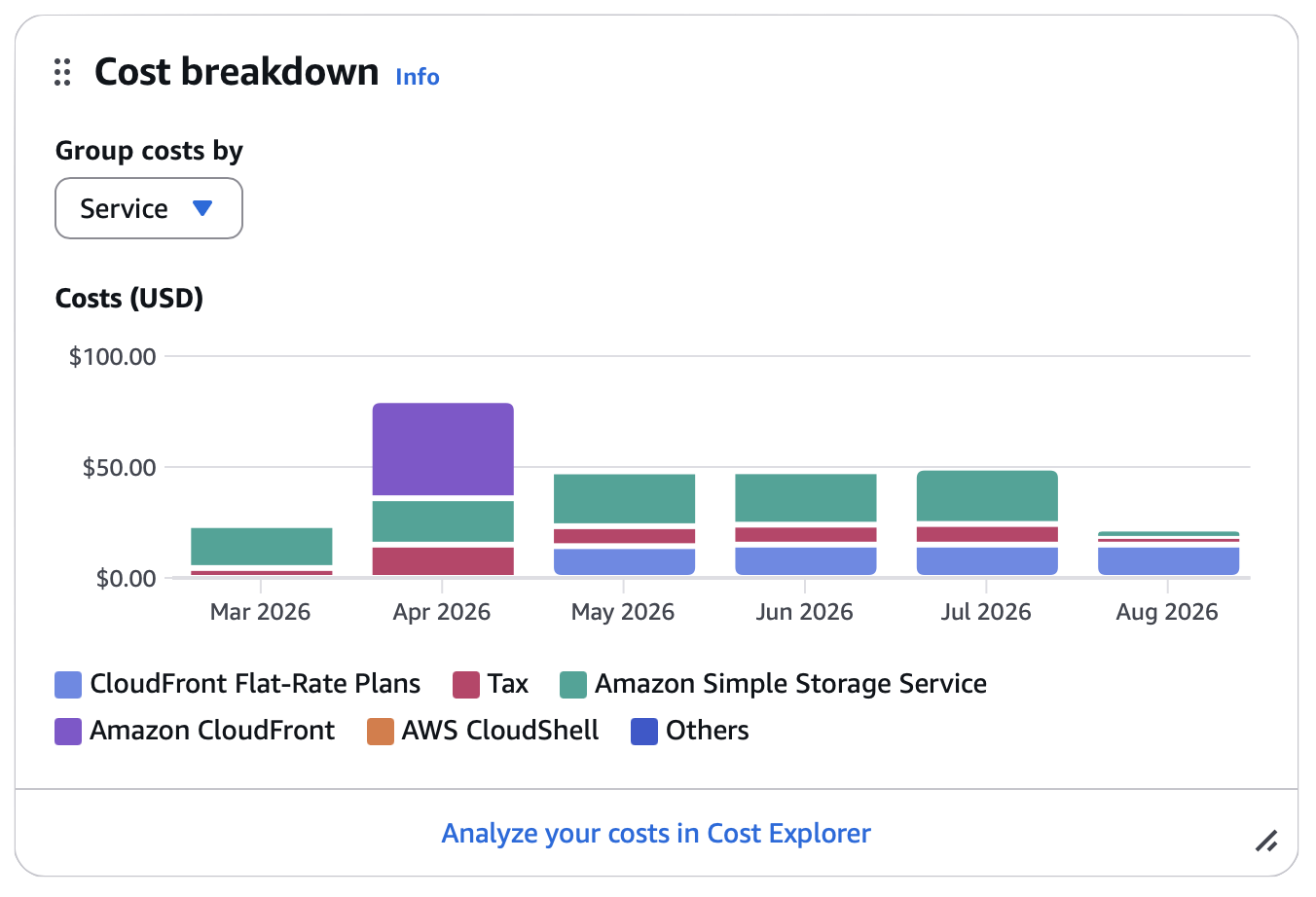
As you can see, storage usage increased by another 40 GB in July. Despite this growth, the total cost remained almost unchanged compared with June, which is very encouraging.
Fly.io
In July, the cost of services hosted on Fly.io was similar to the cost recorded in June. The additional expense of approximately $10 resulted from launching a new service that enables push notifications on mobile devices, including the Vernissage application for iOS.
- Total cost: $399.98
Here is a breakdown of the services currently in use:
| Name | Type | RAM | Amount |
|---|---|---|---|
| push Web Push notifications | shared-cpu-1x | 512MB | 2 machines |
| relay iOS Push notifications | shared-cpu-1x | 512MB | 2 machines |
| web Angular (SSR) application | shared-cpu-2x | 1024MB | 2 machines |
| api Core API | shared-cpu-4x | 2048MB | 2 machines |
| jobs Background/async jobs | shared-cpu-4x | 2048MB | 2 machines |
| proxy Proxy (nginx) service | shared-cpu-2x | 512MB | 2 machines |
| redis Queue service | shared-cpu-2x | 1024MB | 1 machine |
| database PostgreSQL database | performance-2x | 8192MB | 2 machines |
OpenAI
OpenAI services are used by Vernissage to generate photo descriptions and suggest relevant tags.
- Total tokens used: 546,395
- Total requests: 681
- Total cost: $1.48
The cost remains relatively low while helping to improve the accessibility and discoverability of photos shared across the platform.
Donations
Thank you very much for all your contributions. This support is essential to keeping the platform operating in its current form and gives me greater peace of mind when planning its maintenance and future development.
- Patreon contributions: $187.19
- Stripe contributions: $0.00
In July, the total operating cost of the service was $451.17. Unfortunately, I had to cover most of this amount from my personal funds, which represents a significant financial burden.
I hope that more people will consider financially supporting the project. Broader community support would allow me to approach the platform’s future with much greater confidence.
Many people have become accustomed to online platforms being available free of charge without necessarily considering the real cost of operating them. Commercial platforms often recover these costs through advertising, the collection and monetisation of personal data, or algorithmically managed timelines designed to keep users engaged for as long as possible.
Vernissage follows a different approach. It does not display advertisements, sell user data, or use engagement-driven algorithms to manipulate the timeline. For this reason, I would like to ask every user who enjoys the platform and would like to see it continue to consider becoming a supporter. Even a small monthly contribution makes a meaningful difference.
At the moment, Vernissage has 747 registered users (an increase of almost 100 accounts) and 213 of them were active during the last month. The project currently has 33 supporters on Patreon. I sincerely hope that this number will grow in the coming months.
Receiving funding from NLNet would also provide significant support for the project, although I remain cautiously optimistic about the outcome of the grant application.
Thank you again to everyone who supports Vernissage. Your contributions make it possible for the service to continue operating in its current form.
— Marcin Czachurski
A few days ago, I posted an image on Mastodon showing the architecture of Vernissage. After creating it, I thought it would be useful to write a longer article explaining what each service is responsible for. The diagram itself was also slightly simplified and did not include every element of the platform. Maybe this description will help other developers understand how Vernissage is built.
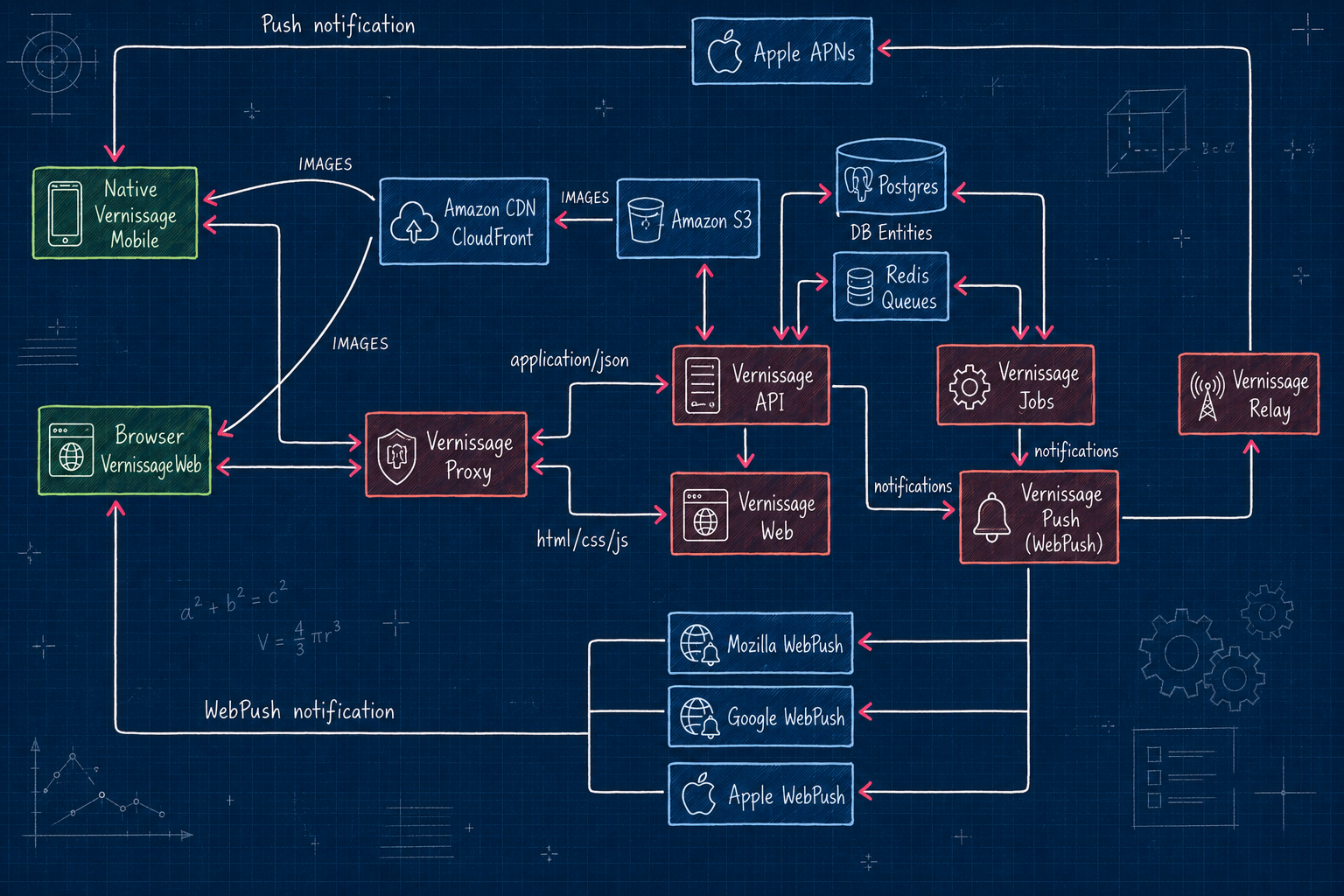
Vernissage is not a platform made of a single application. It is composed of multiple applications and services, each with a different responsibility.
Below is a description of each service and its purpose.
Vernissage API (Swift) is the heart of the whole application. It communicates with the PostgreSQL database, AWS object storage (S3), and Redis, where it sends information about queues that will be processed asynchronously. Relational data is stored in PostgreSQL, while files, mostly photos uploaded by users, are stored in S3. Photos from AWS are then delivered through CloudFront, which acts as a CDN and makes image loading fast for users around the world.
Vernissage Jobs (Swift) is another important backend service. It reads tasks from queues stored in Redis and runs periodic background jobs. In general, this service performs asynchronous work so that users and other Fediverse services do not have to wait for the API response while heavier tasks are being processed.
Vernissage Push (JS/Node) is also a backend service. It receives notifications from the API and Jobs services, and then forwards them either to browser push services using WebPush or to Vernissage Relay. WebPush notifications are delivered to users who have installed Vernissage Web as a PWA and enabled notifications.
Vernissage Relay (JS/Node) is another backend service. It receives notification requests from Vernissage Push and forwards them to APNs, Apple’s push notification service, which then delivers the notification to the user’s phone if they have the Vernissage Mobile app installed. This service can also be used by other Vernissage Fediverse instances to send push notifications to their users’ phones. In that sense, it works similarly to WebPush services provided by browser vendors.
Vernissage Proxy (Nginx) is a very important service. It allows Vernissage to expose two different services, API and Web, under a single domain. Depending on the requested path or accepted response type, based on the Accept header, it forwards the request either to the API service or to the Web service.
Vernissage Web (Typescript/Angular) is a frontend service. It is an Angular application that uses Vernissage API and displays images served from AWS CloudFront, which means they are indirectly loaded from S3. Importantly, this service does not only serve static JS, HTML, and CSS files. It also works as a server-side rendering service. SSR is important because it makes features like OpenGraph possible, so links to user profiles or photo posts can be displayed as rich preview cards in many places.
Vernissage Mobile (SwiftUI) is also a frontend service. More specifically, it is a native iOS application written in SwiftUI. Like the web application, it uses Vernissage Server API and displays images from AWS CloudFront, indirectly backed by S3.
The platform is quite complex, but this architecture also makes it flexible. Each service can be scaled independently, and multiple machines can run the same service when more performance is needed.
This separation of responsibilities makes Vernissage easier to maintain, extend, and optimize over time. It also allows the platform to grow gradually without having to redesign the whole system every time one part needs more resources.
TL;DR: This month, the total operating cost of the https://vernissage.photos platform was $437.77, of which $189.80 was contributed by patrons. Thank you very much for every contribution!
Below is a detailed financial report for operating https://vernissage.photos during June 2026. The report is broken down by individual service providers whose services are essential to keeping the platform running.
Amazon (S3 + CloudFront)
Vernissage uses Amazon S3 to store all user files and relies on Amazon CloudFront - a content delivery network (CDN) - to distribute those files quickly and reliably across the internet.
- Total storage used: 957 GB
- Total number of files: 3,722,519
- Total cost: $48.07
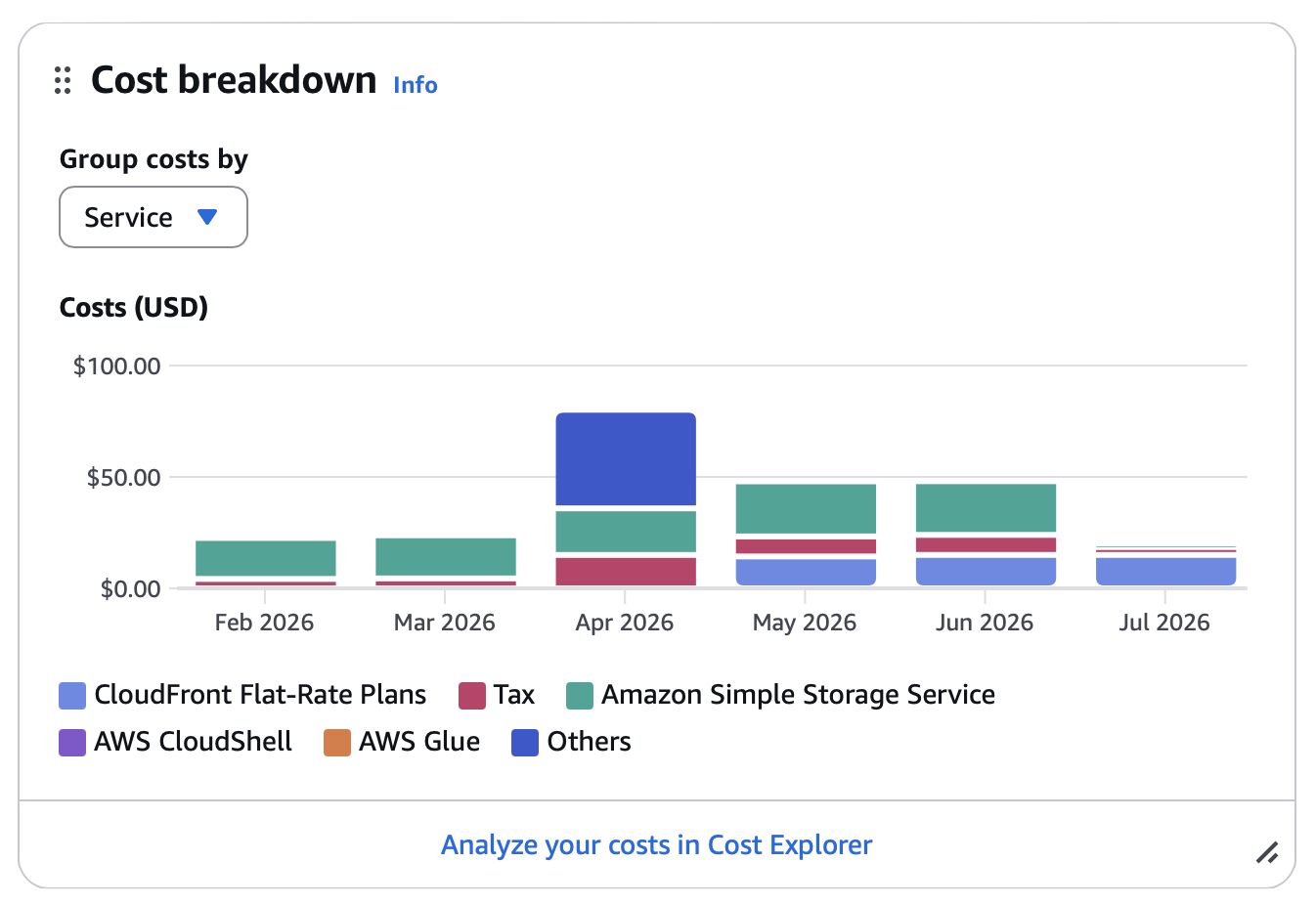
As you can see, in June the storage increased by another 50 GB, which is significantly less than in May. The total cost was practically the same as in May, which I’m very pleased about.
Fly.io
In June, the cost of services hosted on Fly.io was $10 lower than in May, which I’m also very pleased about. The services and their sizes did not change in June.
- Total cost: $388.56
Here’s a breakdown of the services currently in use:
| Name | Type | RAM | Amount |
|---|---|---|---|
| push | shared-cpu-1x | 512MB | 2 machines |
| web | shared-cpu-2x | 1024MB | 2 machines |
| api | shared-cpu-4x | 2048MB | 2 machines |
| jobs | shared-cpu-4x | 2048MB | 2 machines |
| proxy | shared-cpu-2x | 512MB | 2 machines |
| redis | shared-cpu-2x | 1024MB | 1 machine |
| database | performance-2x | 8192MB | 2 machines |
OpenAI
OpenAI is used on Vernissage to generate photo descriptions and suggest relevant tags.
- Total tokens used: 428,680
- Total requests: 524
- Total cost: $1.14
The cost remains relatively low, while still helping improve the accessibility of photos shared across the platform.
Donations
Thank you very much for all your contributions. It is only thanks to this support that the platform can continue operating in its current form, and it gives me a little more peace of mind when it comes to maintaining it.
- Patreon contributions: $164.88
- Stripe contributions: $25.00
In June, the total cost of maintaining the service was $437.77. This is a significant amount, and this time almost half of it was covered by donations. At the moment, we have 648 registered users, which means almost 40 new accounts, and 99 of them were active last month.
I would like to ask every new user (and not only new users) to consider supporting the platform if they are not doing so already. This is the only way to give this place a greater chance of continuing to exist.
Thank you again to everyone who supports the project. Thanks to your contributions, the service can continue to operate exactly as it does today.
— Marcin Czachurski
TL;DR: This month, the total operating cost of the https://vernissage.photos platform was $448.20, of which $326.60 was contributed by patrons. Thank you very much for every contribution!
Below is a detailed financial report for operating https://vernissage.photos during May 2026. The report is broken down by individual service providers whose services are essential to keeping the platform running.
Amazon (S3 + CloudFront)
Vernissage uses Amazon S3 to store all user files and relies on Amazon CloudFront - a content delivery network (CDN) - to distribute those files quickly and reliably across the internet.
- Total storage used: 905 GB
- Total number of files: 3,225,118
- Total cost: $48.01
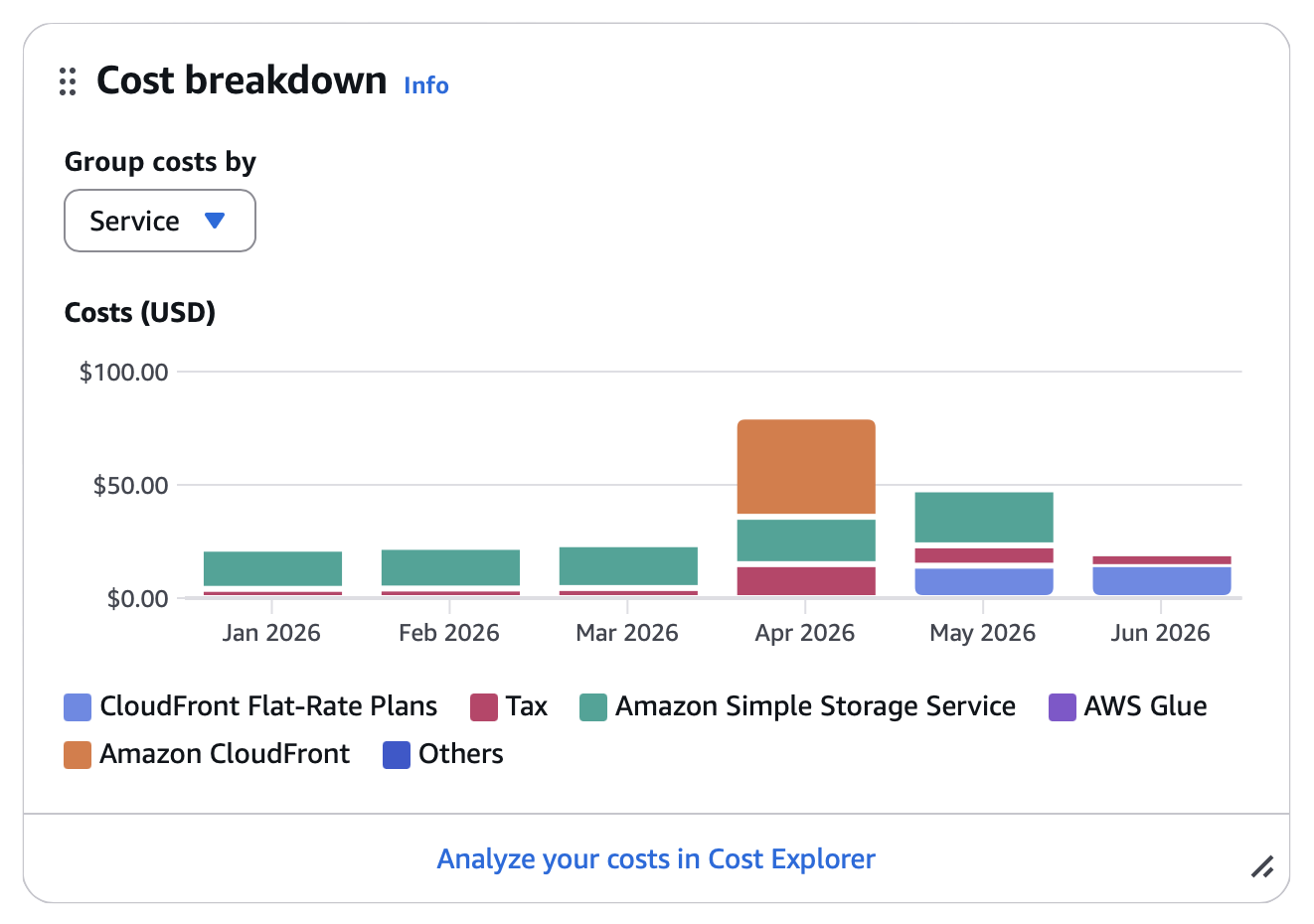
In May, the amount of stored data increased much more than it did in April. In April, storage grew by 60 GB of photos. In May, it grew by as much as 120 GB. This is a significant difference, most likely caused by several new accounts that follow a large number of other users, which means we need to fetch photos from a larger number of servers. At least this month I was not surprised by an additional CloudFront charge, as I now pay $15 for that service.
Fly.io
In May, the cost of services hosted on Fly.io increased by around $20 compared with April. The resource sizes did not change. The increase was mainly caused by significantly higher inbound and outbound traffic, which we are also charged for.
- Total cost: $398.80
Here’s a breakdown of the services currently in use:
| Name | Type | RAM | Amount |
|---|---|---|---|
| push | shared-cpu-1x | 512MB | 2 machines |
| web | shared-cpu-2x | 1024MB | 2 machines |
| api | shared-cpu-4x | 2048MB | 2 machines |
| jobs | shared-cpu-4x | 2048MB | 2 machines |
| proxy | shared-cpu-2x | 512MB | 2 machines |
| redis | shared-cpu-2x | 1024MB | 1 machine |
| database | performance-2x | 8192MB | 2 machines |
OpenAI
OpenAI is used on Vernissage to generate photo descriptions and suggest relevant tags.
- Total tokens used: 541,157
- Total requests: 575
- Total cost: $1.39
The cost remains relatively low, while still helping improve the accessibility of photos shared across the platform.
Donations
Thank you very much to everyone who contributes to supporting the platform. This help is something I simply could not manage without. I am especially grateful to the person who sent a $160 “Gift” contribution - for the second time already. Thank you very, very much. 💚
- Patreon contributions: $326.60
- Stripe contributions: $0.00
In May, the total cost of maintaining the service was $448.20. That is a significant amount, and it looks like this may become the new monthly baseline. It is unfortunate that every server needs to download all resources locally. Overall, this is very inefficient - not only in terms of cost, but also in terms of the resources we consume as the Fediverse. It is hard to call this particularly environmentally friendly.
At the moment, vernissage.photos has 612 registered accounts, and 135 users were active during the last month. The number of registered users increased in May, while the number of active accounts remained at a similar level. To everyone who has recently joined the Vernissage community: please remember that this place can continue to exist only thanks to your support.
Thank you again to everyone who supports the project. Thanks to your contributions, the service can continue to operate exactly as it does today.
— Marcin Czachurski
TL;DR: This month, the total operating cost of the https://vernissage.photos platform was $458.44, of which $181.78 was contributed by patrons. Thank you very much for every contribution!
Below is a detailed financial report for the operation of https://vernissage.photos during the month of April 2026. The report is broken down by individual service providers whose services are essential to keeping the platform running.
Amazon (S3 + CloudFront)
Vernissage uses Amazon S3 to store all user files and relies on Amazon CloudFront - a content delivery network (CDN) - to distribute those files quickly and reliably across the internet.
- Total storage used: 781.3 GB
- Total number of files: 2,674,893
- Total cost: $80.14
As you can see, the amount of data stored in S3 continues to grow steadily. In April, 60GB of new data was added. Since some older data was deleted, the actual amount of newly uploaded data was certainly even higher.
I was very surprised, however, when I saw the Amazon bill. Until now, I had been paying around $20 per month, but this time the bill was $80. When I opened the AWS Console, I saw something that genuinely shocked me.
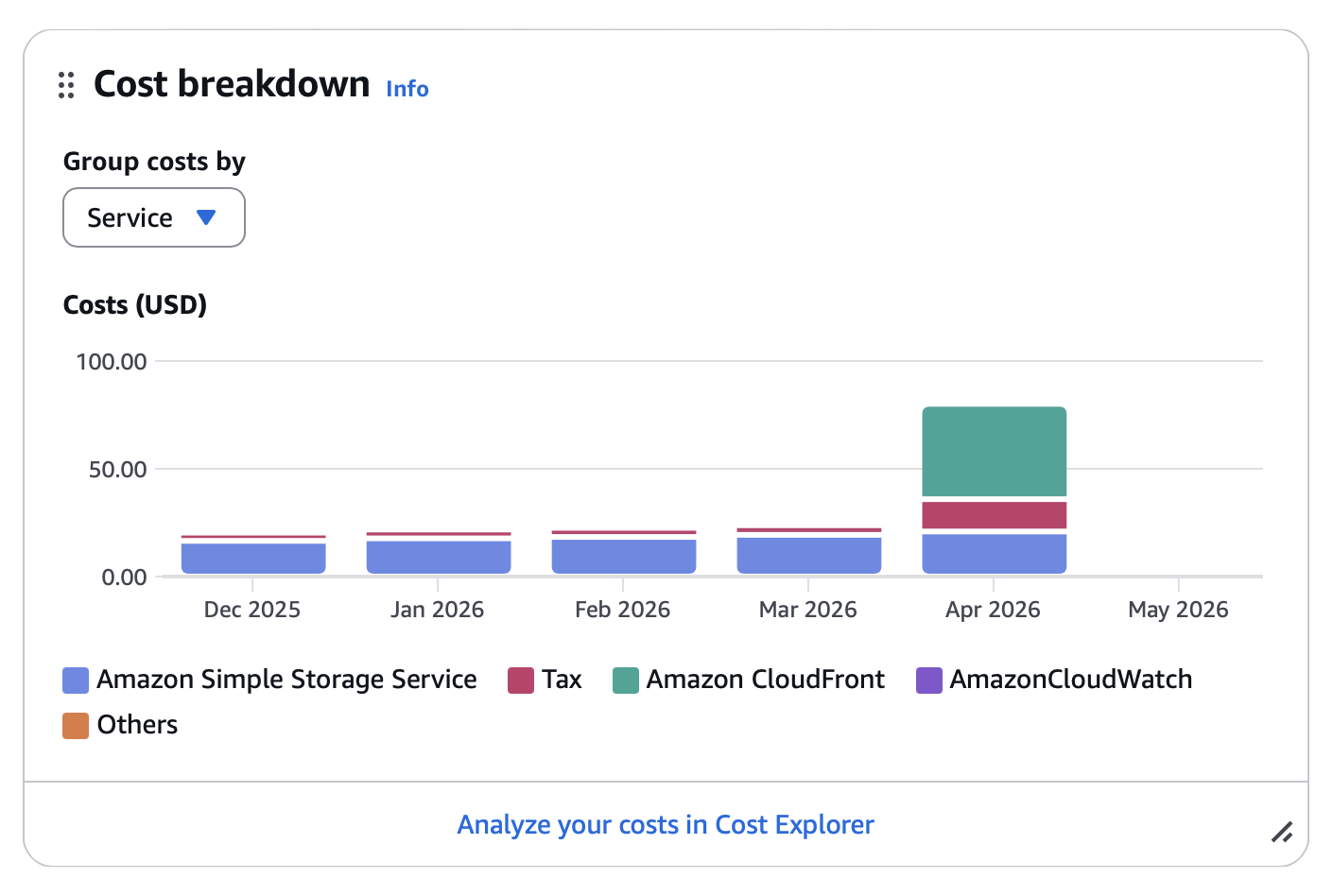
For the first time, Amazon charged me for CloudFront. I have been using this service for well over a year, and it had never appeared in the cost breakdown before. I am not sure why this happened, especially since Amazon itself shows that Vernissage had already been exceeding the free usage tier for some time:
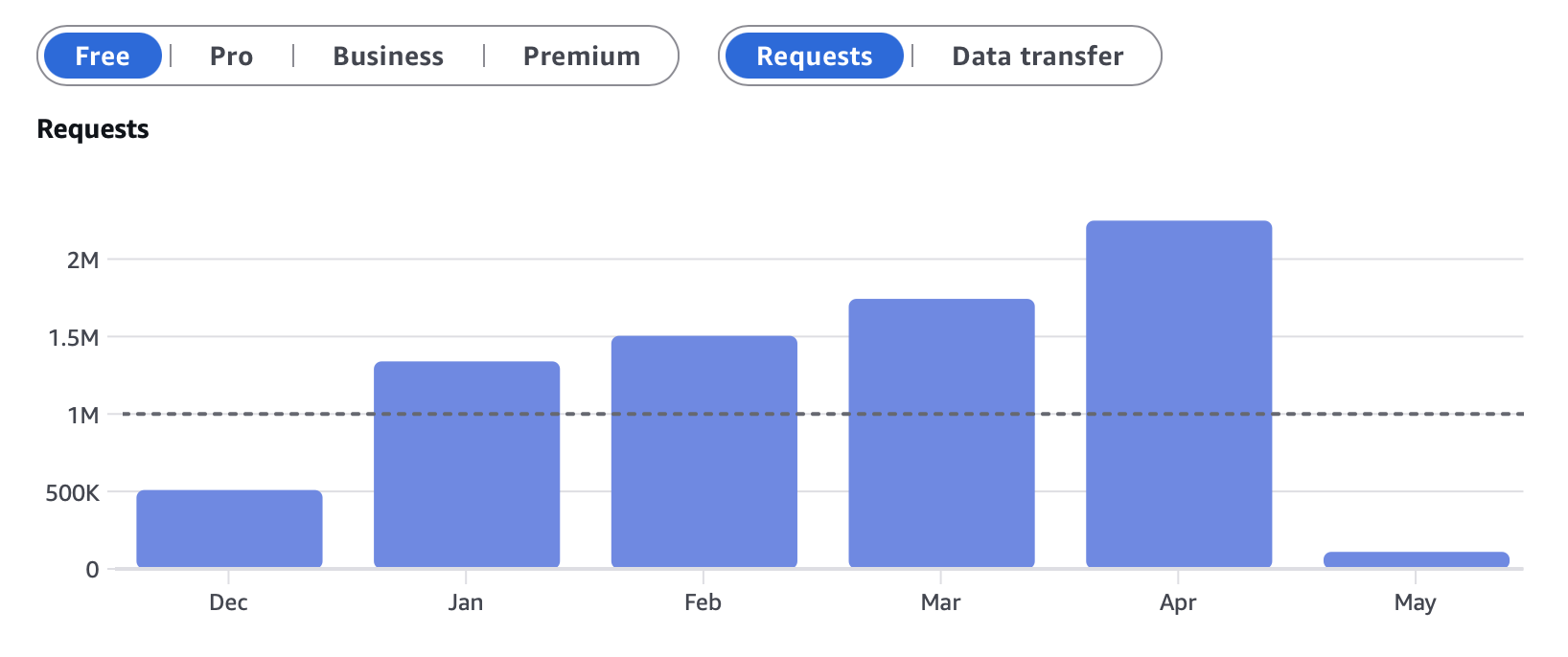
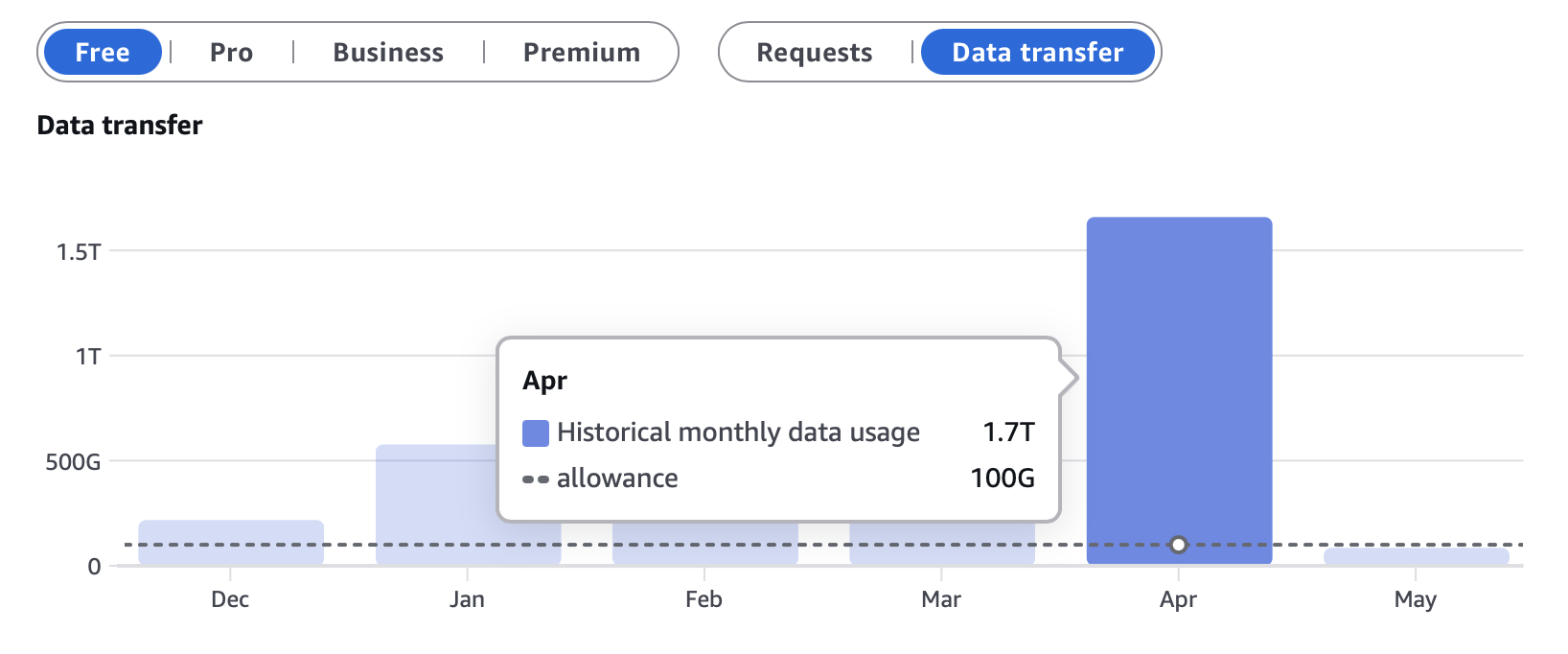
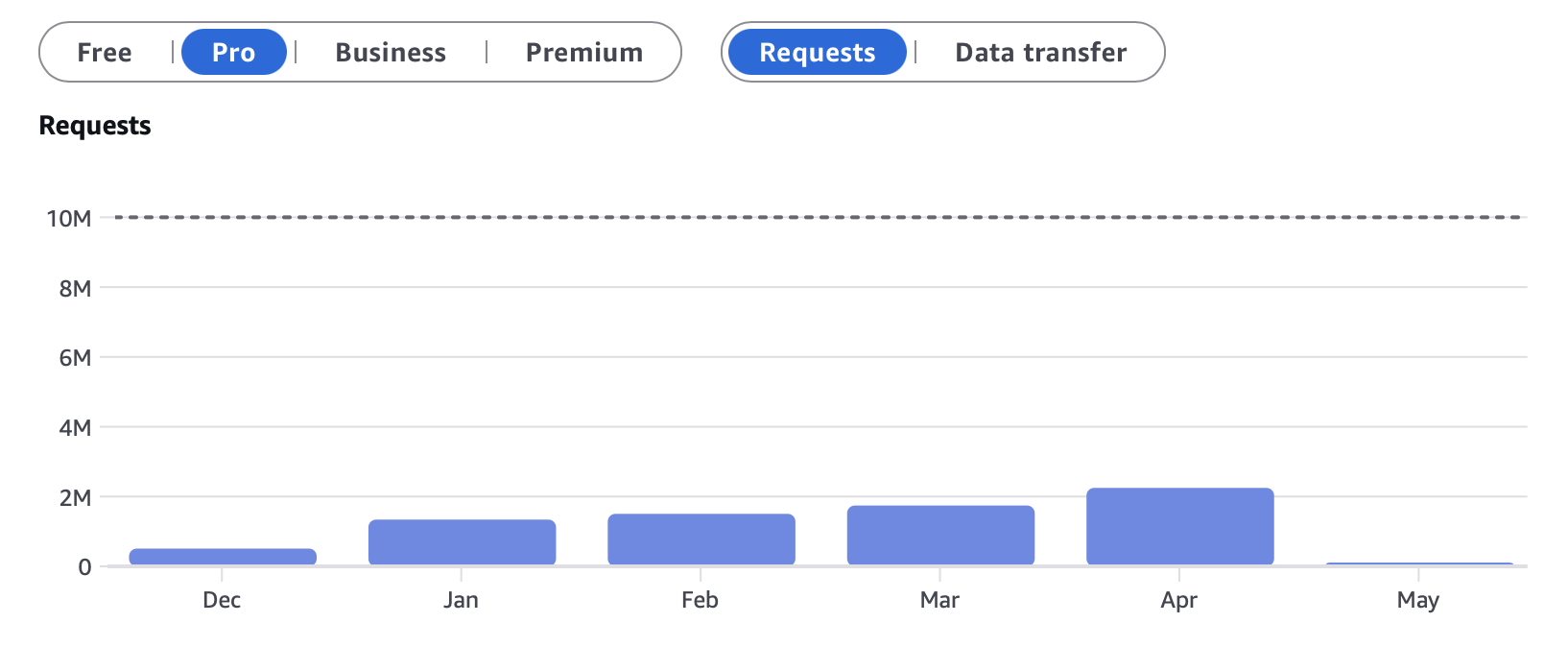
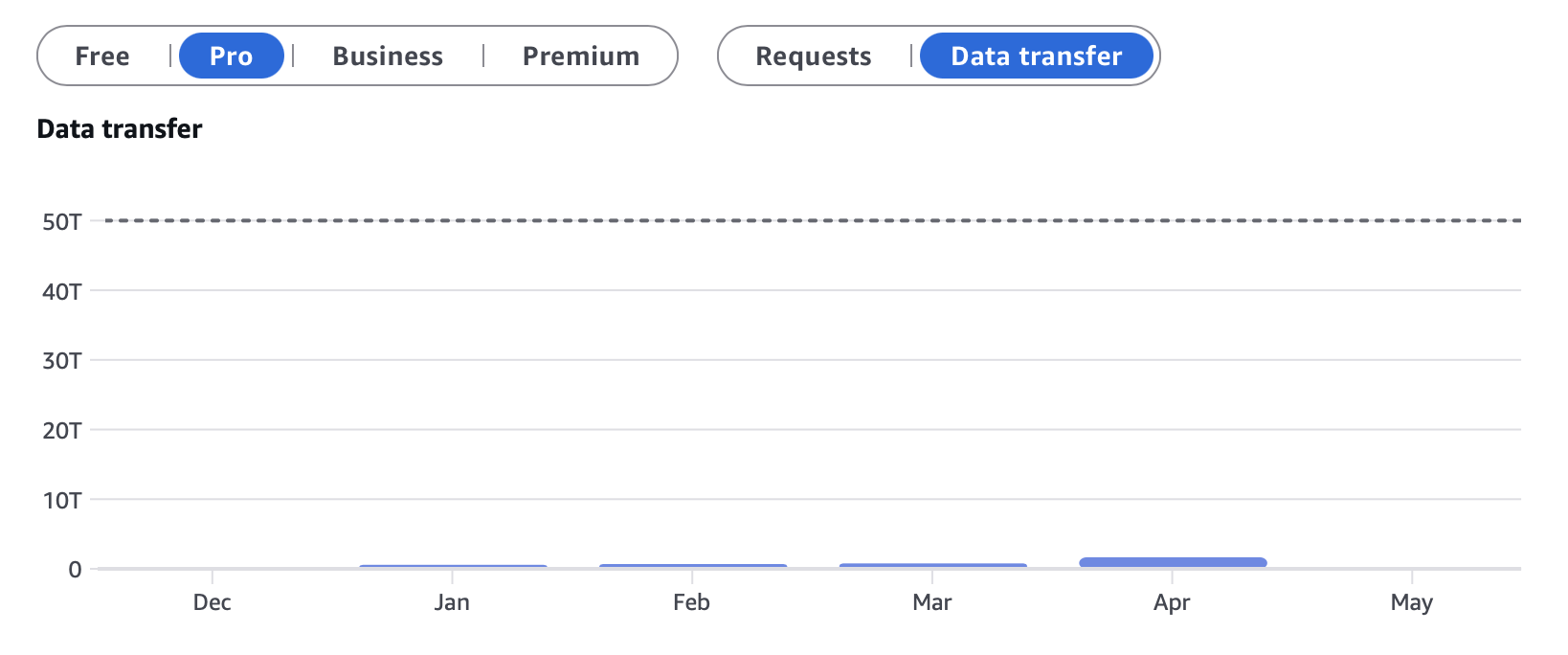
It is possible that we exceeded some other limit. I simply do not know why the increase was so large all at once, as AWS does not provide a detailed usage report for March. To avoid being surprised by this situation again, I changed the CloudFront plan from Pay-as-you-Go to the Pro plan. We now have a fairly large usage buffer, and the cost is $15 per month. This is a better option than paying an additional $60 every month. The usage allowance we now have is shown below.
Below, I am also including the detailed CloudFront usage statistics for April.


The amount of data transfer and the number of requests generated by Vernissage are clearly impressive. I also expect them to continue growing steadily as the number of users increases.
Fly.io
For April, the cost of Fly.io services was similar to March. The size of the services there was not changed. I assume, however, that this will eventually have to change, and sooner or later we will need to move from shared services to performance services. That, unfortunately, will significantly increase costs, which are already quite substantial.
- Total cost: $377.29
Here’s a breakdown of the services currently in use:
| Name | Type | RAM | Amount |
|---|---|---|---|
| push | shared-cpu-1x | 512MB | 2 machines |
| web | shared-cpu-2x | 1024MB | 2 machines |
| api | shared-cpu-4x | 2048MB | 2 machines |
| jobs | shared-cpu-4x | 2048MB | 2 machines |
| proxy | shared-cpu-2x | 512MB | 2 machines |
| redis | shared-cpu-2x | 1024MB | 1 machine |
| database | performance-2x | 8192MB | 2 machines |
OpenAI
OpenAI is used on Vernissage for generating photo descriptions and suggesting relevant tags.
- Total tokens used: 368,382
- Total requests: 444
- Total cost: $1.01
The cost remains relatively low, while still helping improve accessibility of shared photos across the platform.
Donations
Thank you very much for all contributions. Your financial support is what makes it possible for the service to operate at all. Below is information about the contributions you made in April.
- Patreon contributions: $141.78
- Stripe contributions: $40.00
In April, the total cost of maintaining the service was $458.44. That is a significant amount. I hope that next month we will be closer to $400 again. It would also be wonderful if contributions could cover around $200 of the total cost. That would reduce the financial pressure on me personally.
My financial report is especially important for new people who are only just joining vernissage.photos. The website does not run for free, because nothing in the world is truly free. When you upload photos to Instagram, you pay with your privacy, your data, or the time you spend looking at ads shown to you. Vernissage has no ads and no algorithms designed to artificially keep you on the platform. There are only photos created by other artists. So, if you are a user, upload photos, but are not yet among the Patrons, I warmly encourage you to consider joining them. Even the smallest amount helps the platform continue to exist.
At the moment, vernissage.photos has 563 registered accounts, and 138 users were active during the last month. The number of users grew significantly in April, which makes me extremely happy.
Thank you again to everyone who supports the project. Thanks to your contributions, the service can continue to operate exactly as it does today.
— Marcin Czachurski
TL;DR: This month, the total operating cost of the https://vernissage.photos platform was $403.52, of which $307.43 was contributed by patrons. I’m incredibly grateful for this support - especially for one very generous one-time donation that helped a lot in covering this month’s expenses.
Below is a detailed financial report for the operation of https://vernissage.photos during the month of March 2026. The report is broken down by individual service providers whose services are essential to keeping the platform running.
Amazon (S3 + CloudFront)
Vernissage uses Amazon S3 to store all user files and relies on Amazon CloudFront - a content delivery network (CDN) - to distribute those files quickly and reliably across the internet.
- Total storage used: 718.3 GB
- Total number of files: 2,473,206
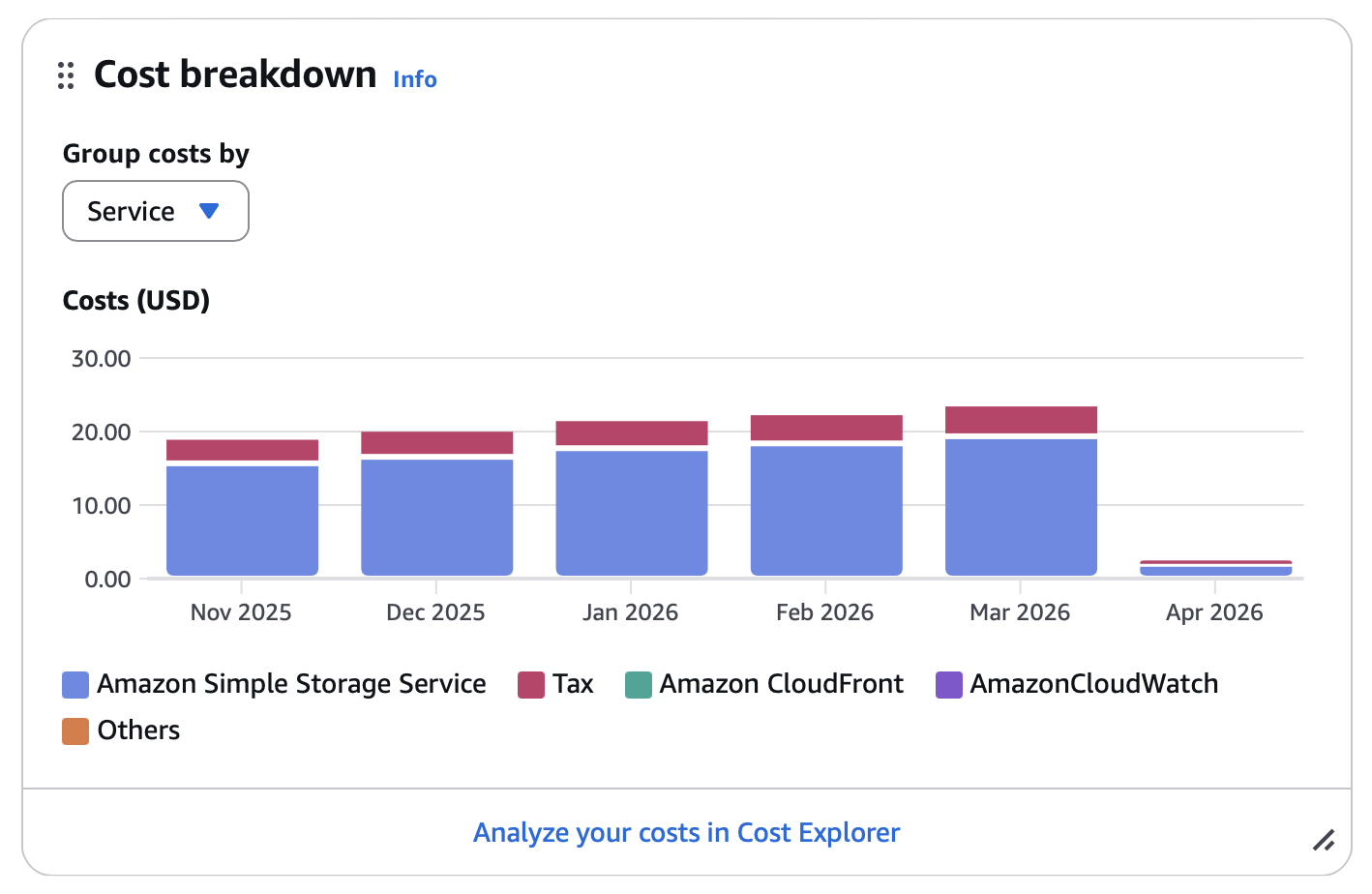
- Total cost: $23.80
The amount of stored data continues to grow steadily, which is a good sign - it means the community is active and constantly sharing new photos. At the same time, it also means that storage costs gradually increase along with the platform.
Fly.io
In March, the cost of services on Fly.io increased noticeably. This was caused by infrastructure changes required to keep the platform stable under heavier traffic.
The api and jobs services had to be upgraded to shared-cpu-4x@2048MB. With the previous setup, lower resources were often causing database connectivity issues, especially during periods of increased activity. This change was necessary to improve reliability and keep the service responsive.
It’s also possible that these resources will need to be increased even further in the future if usage continues to grow.
- Total cost: $378.52
Here’s a breakdown of the services currently in use:
| Name | Type | RAM | Amount |
|---|---|---|---|
| push | shared-cpu-1x | 512MB | 2 machines |
| web | shared-cpu-2x | 1024MB | 2 machines |
| api ⬆️ | shared-cpu-4x | 2048MB | 2 machines |
| jobs ⬆️ | shared-cpu-4x | 2048MB | 2 machines |
| proxy | shared-cpu-2x | 512MB | 2 machines |
| redis | shared-cpu-2x | 1024MB | 1 machine |
| database | performance-2x | 8192MB | 2 machines |
OpenAI
OpenAI is used on Vernissage for generating photo descriptions and suggesting relevant tags.
- Total tokens used: 431,888
- Total requests: 518
- Total cost: $1.20
The cost remains relatively low, while still helping improve accessibility of shared photos across the platform.
Donations
Huge thanks to all the patrons and supporters who help keep Vernissage running. Your support truly makes a difference.
- Patreon contributions: $307.43
- Stripe contributions: $0.00
I would also like to say a very special thank you for a large one-time donation this month. It helped tremendously with covering the operating costs, and I truly appreciate that generosity.
In March, the total cost of maintaining the service was $403.52. Even though community support covered a significant part of that amount this month, running the platform is still a real and ongoing expense. Every contribution helps keep Vernissage online and allows it to continue operating in its current form.
Vernissage remains a fully independent platform. There are no ads, no engagement algorithms, and no artificial pressure to chase visibility. It is built around something much more valuable: a real community of people who simply want to share photography in a calm, meaningful space.
At the moment, vernissage.photos has 498 registered accounts, and 98 users were active during the last month. We are now very close to 100 monthly active users, which is honestly amazing to see.
Thank you again to everyone who supports the project. Thanks to your contributions, the service can continue to operate exactly as it does today.
— Marcin Czachurski
TL;DR: This month, the total operating cost of the https://vernissage.photos platform was $363.90, of which $125.76 was contributed by patrons. I’m deeply thankful for this support - it plays an important role in keeping the platform running and helps make its current form possible.
Below is a detailed financial report for the operation of https://vernissage.photos during the month of February 2026. The report is broken down by individual service providers whose services are essential to the functioning of the application.
Amazon (S3 + CloudFront)
Vernissage uses Amazon S3 to store all user files and relies on Amazon CloudFront - a content delivery network (CDN) - to distribute those files quickly and reliably across the internet.
- Total storage used: 677.5 GB
- Total number of files: 2,300,665
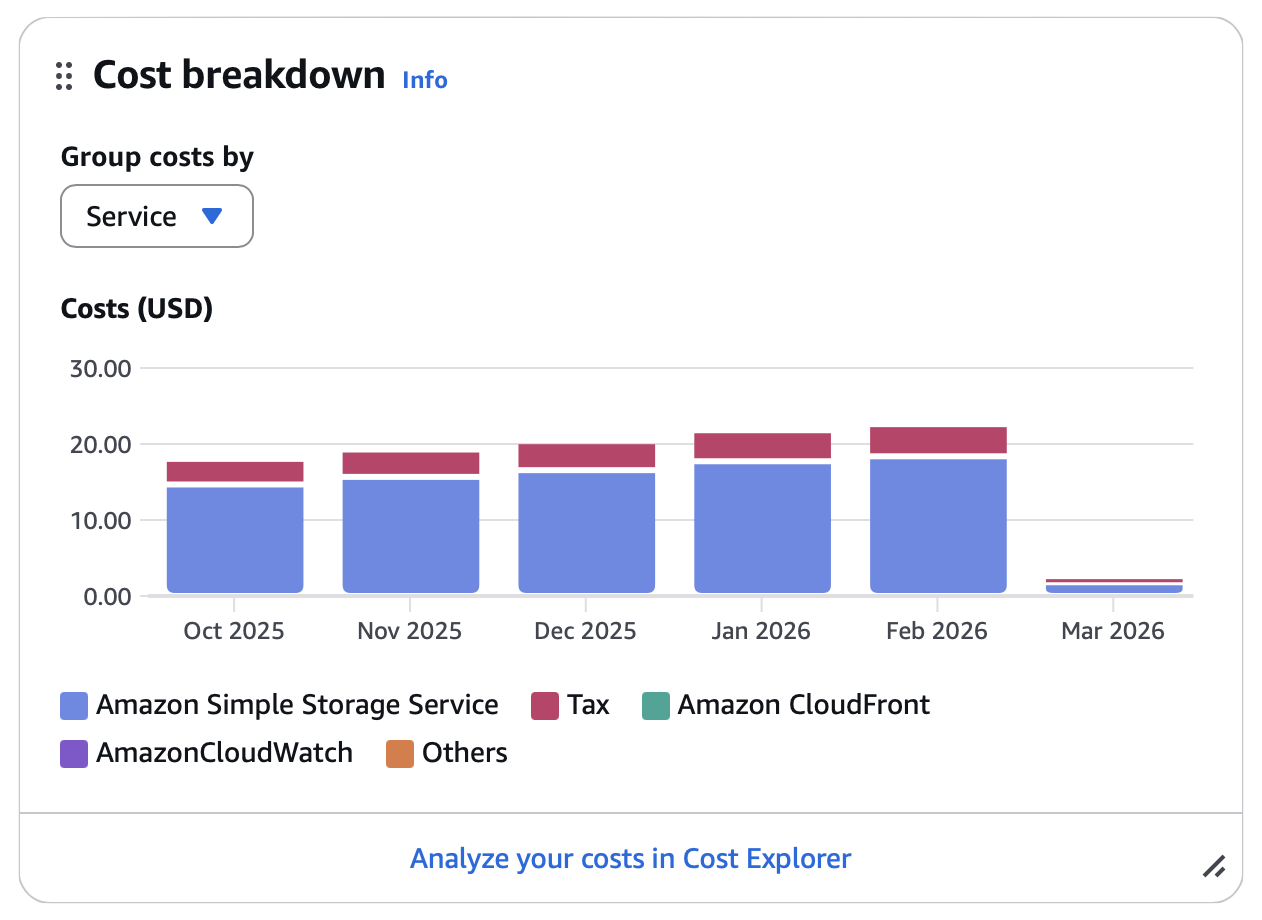
- Total cost: $22.61
The number of photos is enormous, and the process of reducing the retention period for photos stored in Amazon S3 is still ongoing (the goal is 3 months).
Fly.io
In February, the cost of services on fly.io is very similar to the cost in January. The resources allocated to individual services have not been changed in any way. The cost is still very high. I’m still waiting for a decision regarding the NLnet grant, which could ease my financial burden a bit. If that doesn’t work out and support from patrons doesn’t increase, I’ll have to change something - definitely not for the better.
- Total cost: $340.45
Here’s a breakdown of the services currently in use:
| Name | Type | RAM | Amount |
|---|---|---|---|
| push | shared-cpu-1x | 512MB | 2 machines |
| web | shared-cpu-2x | 1024MB | 2 machines |
| api | shared-cpu-2x | 2048MB | 2 machines |
| jobs | shared-cpu-2x | 2048MB | 2 machines |
| proxy | shared-cpu-2x | 512MB | 2 machines |
| redis | shared-cpu-2x | 1024MB | 1 machine |
| database | performance-2x | 8192MB | 2 machines |
OpenAI
The use of OpenAI for generating photo descriptions and suggesting relevant tags has remained at a consistent level.
- Total tokens used: 290,465
- Total requests: 378
- Total cost: $0.84
Donations
Huge thanks to all the patrons who make it possible to keep the platform running - and a warm welcome to those who joined last month! Your support truly keeps this project alive, and I’m deeply grateful for it.
- Patreon contributions: $125.76
- Stripe contributions: $0.00
In January, the cost of maintaining the service was $363.90. This is similar to the cost in January 2026. It’s a large expense. Community support is crucial for me. For now, I’m covering most of the costs out of my own pocket.
At the moment, vernissage.photos has 475 registered users, of whom 86 were active in the last month. The project is supported by 24 people. I hope this number will grow in the future so that I can focus more on developing the project.
Thanks again to everyone for your incredible support - it really means the world to me.
— Marcin Czachurski
TL;DR: This month, the total operating cost of the https://vernissage.photos platform was $397.06, of which $120.36 was contributed by patrons. I’m deeply thankful for this support - it plays an important role in keeping the platform running and helps make its current form possible.
Below is a detailed financial report for the operation of https://vernissage.photos during the month of January 2026. The report is broken down by individual service providers whose services are essential to the functioning of the application.
Amazon (S3 + CloudFront)
Vernissage uses Amazon S3 to store all user files and relies on Amazon CloudFront - a content delivery network (CDN) - to distribute those files quickly and reliably across the internet.
- Total storage used: 645.6 GB
- Total number of files: 2,157,256
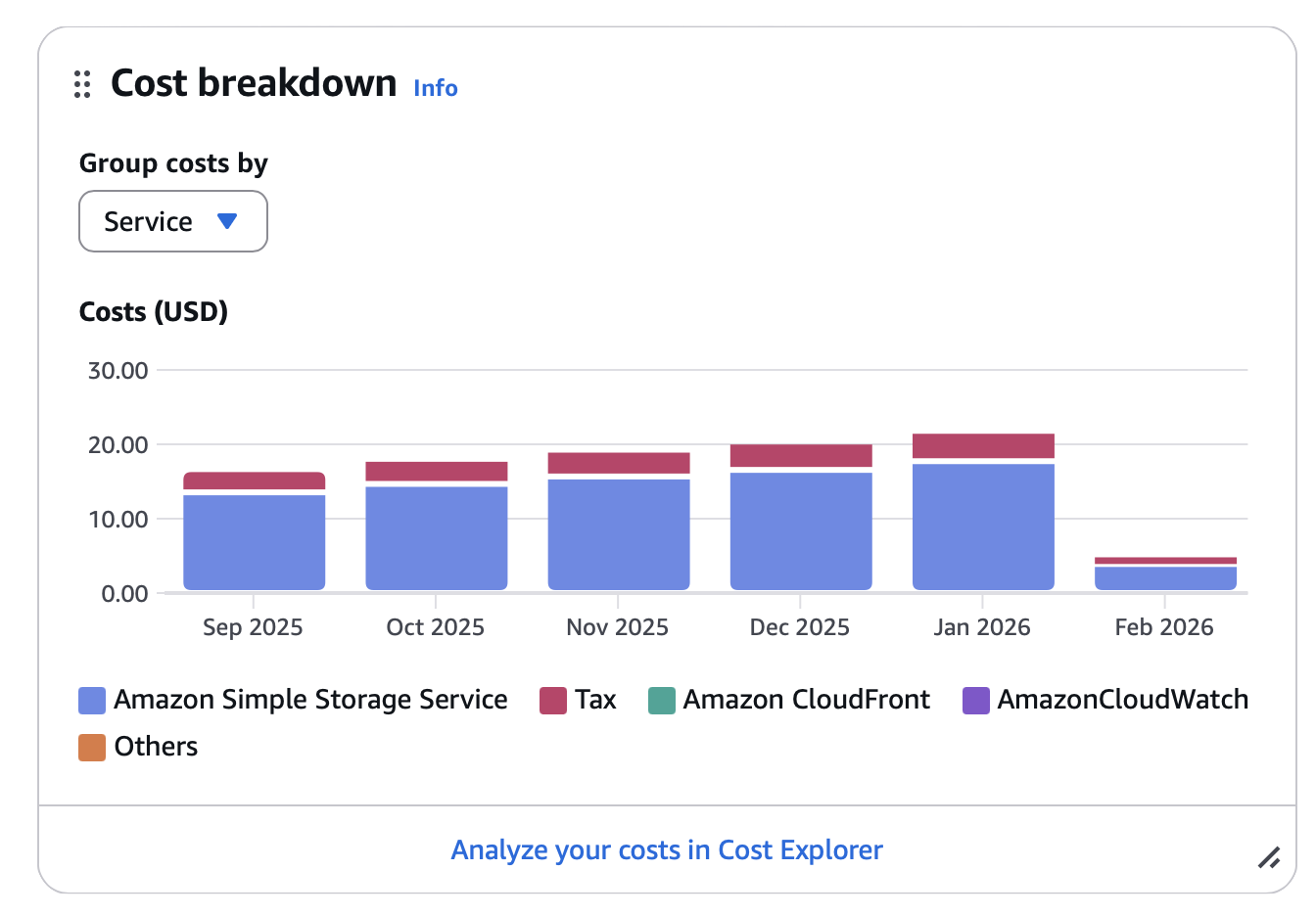
- Total cost: $21.81
The number of photos is enormous, and the process of reducing the retention period for photos stored in Amazon S3 is still ongoing (the goal is 3 months).
Fly.io
In January, the cost of services on fly.io is very similar to the cost in December. The resources allocated to individual services have not been changed in any way. The cost is still very high. I’m still waiting for a decision regarding the NLnet grant, which could ease my financial burden a bit. If that doesn’t work out and support from patrons doesn’t increase, I’ll have to change something - definitely not for the better.
- Total cost: $375.07
Here’s a breakdown of the services currently in use:
| Name | Type | RAM | Amount |
|---|---|---|---|
| push | shared-cpu-1x | 512MB | 2 machines |
| web | shared-cpu-2x | 1024MB | 2 machines |
| api | shared-cpu-2x | 2048MB | 2 machines |
| jobs | shared-cpu-2x | 2048MB | 2 machines |
| proxy | shared-cpu-2x | 512MB | 2 machines |
| redis | shared-cpu-2x | 1024MB | 1 machine |
| database | performance-2x | 8192MB | 2 machines |
OpenAI
The use of OpenAI for generating photo descriptions and suggesting relevant tags has remained at a consistent level.
- Total tokens used: 414,708
- Total requests: 514
- Total cost: $0.18
Donations
Huge thanks to all the patrons who make it possible to keep the platform running - and a warm welcome to those who joined last month! Your support truly keeps this project alive, and I’m deeply grateful for it.
- Patreon contributions: $120.36
- Stripe contributions: $0.00
In January, the cost of maintaining the service was $394.57. This is similar to the cost in December 2025. It’s a large expense. Community support is crucial for me. For now, I’m covering most of the costs out of my own pocket.
At the moment, vernissage.photos has 458 registered users, of whom 109 were active in the last month. The project is supported by 22 people. I hope this number will grow in the future so that I can focus more on developing the project.
Thanks again to everyone for your incredible support - it really means the world to me.
— Marcin Czachurski
TL;DR: This month, the total operating cost of the https://vernissage.photos platform was $394.57, of which $135.60 was contributed by patrons. I’m deeply thankful for this support - it plays an important role in keeping the platform running and helps make its current form possible.
Below is a detailed financial report for the operation of https://vernissage.photos during the month of December. The report is broken down by individual service providers whose services are essential to the functioning of the application.
Amazon (S3 + CloudFront)
Vernissage uses Amazon S3 to store all user files and relies on Amazon CloudFront - a content delivery network (CDN) - to distribute those files quickly and reliably across the internet.
- Total storage used: 609.1 GB
- Total number of files: 1,986,742
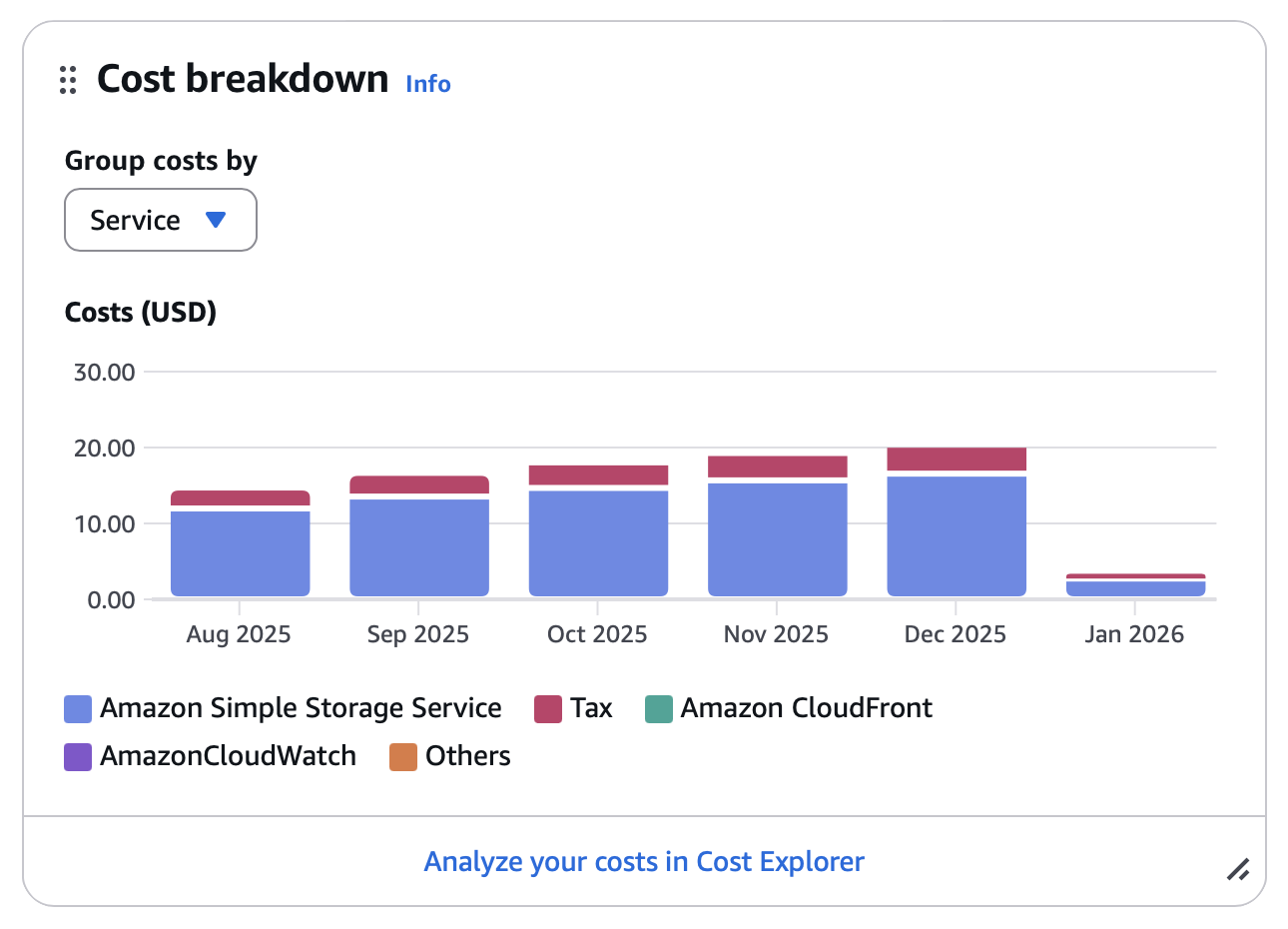
- Total cost: $20.37
The number of photos is enormous, and the process of reducing the retention period for photos stored in Amazon S3 is still ongoing (the goal is 3 months).
Fly.io
In December, the cost of services on fly.io increased significantly. This was, of course, caused by the migration to a managed Postgres setup and the much higher fees for resources (which are also larger).
On the positive side, I haven’t observed any performance issues since then, nor any problems with integration with other instances. However, the cost is substantial, and without external support it will be difficult for me to sustain this in the long term.
I hope to receive a grant from NLnet, as that would help me a great deal.
- Total cost: $373.76
Here’s a breakdown of the services currently in use:
| Name | Type | RAM | Amount |
|---|---|---|---|
| push | shared-cpu-1x | 512MB | 2 machines |
| web | shared-cpu-2x | 1024MB | 2 machines |
| api | shared-cpu-2x | 2048MB | 2 machines |
| jobs | shared-cpu-2x | 2048MB | 2 machines |
| proxy | shared-cpu-2x | 512MB | 2 machines |
| redis | shared-cpu-2x | 1024MB | 1 machine |
| database | performance-2x | 8192MB | 2 machines |
OpenAI
The use of OpenAI for generating photo descriptions and suggesting relevant tags has remained at a consistent level.
- Total tokens used: 151,357
- Total requests: 192
- Total cost: $0.44
Donations
Huge thanks to all the patrons who make it possible to keep the platform running - and a warm welcome to those who joined last month! Your support truly keeps this project alive, and I’m deeply grateful for it.
- Patreon contributions: $110.60
- Stripe contributions: $25.00
In December, service maintenance costs totaled $394.57, which is a noticeable increase compared to November due to expanded database resources. This makes the support of the community especially important. Aside from Patreon/Stripe contributions, I personally handle all ongoing expenses, without the backing of a company or corporate sponsor.
This independence ensures that photos shared by users remain fully respected and are used only for their intended purpose - being displayed on the platform, and nothing more.
Thanks again to everyone for your incredible support - it really means the world to me.
— Marcin Czachurski